
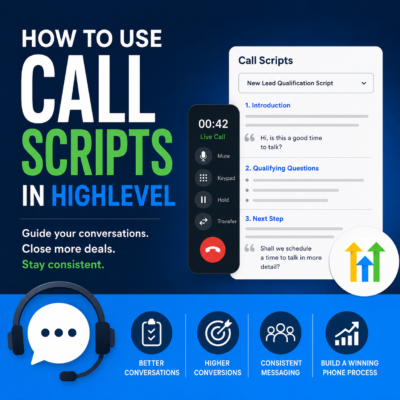
 If your team regularly makes sales calls, follow-up calls or customer service calls,
HighLevel Call Scripts can help you improve consistency, boost conversions
and reduce training time.Instead of relying on memory, your team can have a proven script displayed alongside the
phone call. This helps ensure every important question is asked and every conversation ends
with a clear next step.
It is one of those HighLevel features that is easy to miss. Once you start using it, you may
wonder how your team managed without it.
What Are Call Scripts in HighLevel?
Call Scripts allow you to create reusable scripts that your team can view while making phone
calls through HighLevel’s built-in phone system.
A script can be opened during a live call, giving your team prompts, questions, objection
handling and closing statements exactly when they need them.
| Did you find this content useful? |
|---|
| Sign up for my free Marketing Hints, Tips and Hacks email newsletter every Tuesday at 11am. => Sign up here <= |
If the conversation changes direction, the user can switch to a different script without
ending the call.
Think of Call Scripts as a digital sales playbook that is always available during every
conversation.
Why Use Call Scripts?
Even experienced telesales salespeople occasionally forget to ask an important question or mention a
key benefit.
HighLevel Call Scripts help ensure every prospect or customer receives a consistent
experience.
Some of the main benefits include:
- Better sales conversations
- Faster onboarding for new staff
- Consistent messaging across your team
- Easier objection handling
- Higher conversion rates
- Less reliance on memory
- Greater confidence on the phone
Call Scripts are just as useful for customer service teams as they are for sales teams.
Who Should Use HighLevel Call Scripts?
Almost any business that regularly speaks to prospects or customers by phone can benefit
from using Call Scripts.
Examples include:
- Marketing agencies
- Estate agents
- Mortgage advisers
- Dentists
- Accountants
- Trades businesses
- Coaches and consultants
- Recruitment agencies
- Customer support teams
- Appointment setters
How to Set Up Call Scripts in HighLevel
Creating a Call Script in HighLevel only takes a few minutes.
Inside your HighLevel sub-account, navigate to:
Settings > Phone System > Voice > Call Scripts
Then follow these steps:
- Click Add Script.
- Give your script a clear and descriptive name.
- Enter or paste your call script into the editor.
- Review the script and make any required changes.
- Click Save.
You can create different scripts for different products, services, types of prospect and
stages of your sales process.
How to Use a Call Script During a Live Call
When making a call through HighLevel’s phone system, click the
Scripts button inside the call window.
Select the script you want to use and it will appear alongside the live call.
If the conversation changes, you can switch to another script without interrupting the call.
For example, you might start with a new enquiry script and then switch to a price objection
script if the prospect raises concerns about cost.
This gives your team guidance and confidence while still allowing the conversation to feel
natural.
Examples of HighLevel Call Scripts
Most businesses will benefit from creating a library of scripts rather than relying on a
single script for every conversation.
New Lead Qualification Script
Use this script to understand what the prospect needs, establish whether they are a good fit
and agree on the next step.
Discovery Call Script
A discovery call script can help your team ask structured questions about the prospect’s
goals, challenges, budget, timing and decision-making process.
Product Demonstration Script
Use a demonstration script to guide prospects through the most relevant features and
benefits while addressing common questions.
Follow-Up Call Script
A follow-up script can help your team reconnect with prospects who have received a proposal,
attended a demonstration or expressed interest but have not yet made a decision.
Existing Customer Upsell Script
Use this script to introduce additional products or services based on the customer’s existing
purchase, needs or previous conversations.
Review Request Script
A review request script can help your team ask satisfied customers to leave a genuine review
on Google, Facebook or another relevant platform.
Referral Request Script
Use a referral script to ask happy customers whether they know anyone else who may benefit
from your services.
Combine Call Scripts with Call Dispositions
Call Scripts tell your team what to say.
Call Dispositions record what happened once the call has
finished.
After completing a call, your team might select a disposition such as:
- Appointment Booked
- Follow-Up Required
- Left Voicemail
- No Answer
- Quote Requested
- Not Interested
- Existing Customer
- Wrong Number
Depending on how your HighLevel account is configured, Call Dispositions can be used to help
standardise follow-up actions and reporting.
They may form part of a wider process that:
- Triggers a HighLevel workflow
- Sends an email or SMS message
- Creates a follow-up task
- Updates an opportunity
- Moves a prospect through a sales pipeline
- Reports on call outcomes
Together, Call Scripts and Call Dispositions can help create a more consistent phone process.
Your team knows what to cover during the call and can accurately record the result afterwards.
Use AI to Improve Your Call Scripts
You do not have to write every call script from scratch.
Tools such as ChatGPT and HighLevel’s AI features can help you:
- Create scripts for different industries
- Improve your qualifying questions
- Draft responses to common objections
- Rewrite scripts in your preferred tone of voice
- Create different versions for different types of prospect
- Shorten long scripts into practical call prompts
- Improve scripts based on feedback from your sales team
The important point is that someone should review the finished script before it is used.
AI can help you produce a useful first draft, but the script should still reflect your
services, customers and real sales process.
Best Practices for HighLevel Call Scripts
Keep the Script Conversational
Avoid creating a long block of text that your team has to read word for word. Customers can
usually tell when someone is reading from a rigid script.
Use Prompts Rather Than Paragraphs
Short prompts, questions and reminders are often easier to use during a live conversation.
Include Qualifying Questions
Make sure the script helps your team understand the prospect’s needs, urgency, budget and
decision-making process.
Add Common Objections
Include short responses to the objections your team hears most often, such as concerns about
price, timing, contracts or implementation.
Finish with a Clear Next Step
Every script should lead towards a clear outcome, such as booking a meeting, arranging a
demonstration, sending a proposal or agreeing on a follow-up date.
Review Your Scripts Regularly
Your scripts should evolve as your services change and your team learns which questions and
responses work best.
Common Call Script Mistakes
Avoid these common mistakes:
- Reading the script word for word
- Using the same script for every type of prospect
- Creating scripts that are too long
- Forgetting to include qualifying questions
- Failing to agree on a clear next step
- Not updating scripts as your business changes
- Giving staff scripts without explaining how to use them
A Call Script should guide the conversation. It should not prevent your team from listening
and responding naturally.
Julian Mills’ View
Call Scripts are one of HighLevel’s hidden gems.
They are simple to set up, but they can make a noticeable difference to the consistency of
your sales and customer service calls.
I do not recommend reading a script word for word. Customers can usually tell when someone
sounds robotic.
Instead, think of your Call Script as a checklist of the important questions, benefits,
objections and next steps you want to cover.
Used properly, scripts help ensure every customer receives a consistent experience while
still allowing the person making the call to use their own personality and judgement.
When combined with HighLevel’s phone system, pipelines, workflows, AI and Call Dispositions,
Call Scripts can become an important part of a repeatable sales process.
Frequently Asked Questions About HighLevel Call Scripts
Can I create multiple Call Scripts in HighLevel?
Yes. You can create different scripts for products, services, teams, prospect types and
stages of your sales process.
Can I switch scripts during a call?
Yes. If the conversation changes direction, you can select a different script while the call
is still in progress.
Should my team read the script exactly?
No. In most cases, the script should be used as a guide. It should help the user remember
important questions and talking points while keeping the conversation natural.
Can Call Scripts trigger automations?
The script itself is designed to guide the conversation. For follow-up automation, you may
use features such as workflows, pipeline updates, tasks and Call Dispositions.
Can AI write my HighLevel Call Scripts?
AI can help create a first draft, improve objection handling and adapt a script for different
audiences. The finished script should still be reviewed and tested by your team.
What is the difference between Call Scripts and Call Dispositions?
Call Scripts guide what your team says during the conversation. Call Dispositions help
categorise or record the outcome after the call. Check out my blog post on Call Dispositions.
Final Thoughts
HighLevel Call Scripts are a simple feature that can make a significant difference to the
quality and consistency of your phone conversations.
Whether you are onboarding new staff, improving sales performance or trying to provide a
consistent customer experience, Call Scripts give your team a practical framework to follow.
For even better results, combine Call Scripts with Call Dispositions, HighLevel workflows,
opportunity pipelines and AI-assisted follow-up.
This helps you create a more complete process, from the first conversation through to the
agreed next step.
Need Help Setting Up HighLevel?
I help UK businesses, marketing consultants and agencies get more value from HighLevel using
a practical, Done With You approach.
We can help you plan your phone processes, create effective Call Scripts, configure your
sales pipeline and build the workflows needed to follow up every call.

About the Author
Julian Mills
HighLevel Consultant & Marketing Automation Strategist
Julian Mills helps business owners automate lead generation, sales follow-up, customer communication and business processes using HighLevel and MarketerM8. Since 2009 he has helped businesses implement CRM, marketing automation and AI-powered systems that save time, improve customer experience and generate more sales.
About Julian
Book a Discovery Call
Join a Free HighLevel Workshop
Learn About HighLevel with MarketerM8

