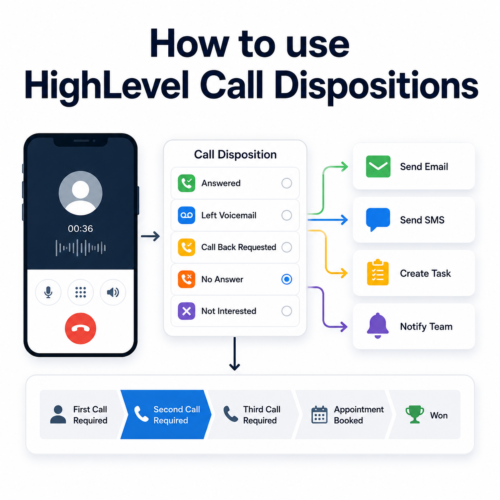
If you are only using HighLevel Call Dispositions to record the outcome of a phone call, you are missing one of the most powerful sales automation opportunities within the platform.
Useful? Yes.
Transformational? Not really.
When we build HighLevel systems for clients, we think about call dispositions very differently.
A call disposition is not simply a record of what happened. It is the decision that determines what happens next.
Should HighLevel send an email?
| Did you find this content useful? |
|---|
| Sign up for my free Marketing Hints, Tips and Hacks email newsletter every Tuesday at 11am. => Sign up here <= |
Should it send a text message?
Should it move the opportunity to the next stage of your sales pipeline?
Should it create a task to call the prospect again tomorrow?
Should it notify a manager?
Should it start onboarding a brand-new customer?
Instead of relying on your sales team to remember every next step, HighLevel can make those decisions automatically.
That is when your CRM stops being a database and starts becoming an active member of your sales team.
What Are HighLevel Call Dispositions?
A Call Disposition records the outcome of a telephone call.
Typical call dispositions might include:
- No Answer
- Left Voicemail
- Call Back Requested
- Appointment Booked
- Qualified
- Proposal Required
- Sale Won
- Not Interested
- Wrong Number
- Do Not Call
Most CRM systems simply store this information for reporting.
HighLevel allows you to do something much more valuable.
Each call outcome can trigger a different workflow, meaning every prospect receives the most appropriate follow-up based on what actually happened during the call.
Two Ways to Set Up Call Dispositions in HighLevel
There are two ways to implement Call Dispositions in HighLevel.
The best method depends on whether your sales or customer service team make their calls through HighLevel or use a separate phone system.
Option 1. Use HighLevel’s Built-In Call Disposition Feature
The official method is to use the Call Disposition feature included as part of the HighLevel dialler.
This is the recommended approach when your sales or customer service team make and receive calls through HighLevel, either using the desktop version or the HighLevel mobile app.
At the end of each call, the user selects the appropriate disposition to record the outcome.
That disposition can then be used to:
- trigger workflows
- send follow-up messages
- create tasks
- move opportunities through a pipeline
- notify team members
- support management reporting
For businesses using HighLevel as their main phone system, this provides the most integrated calling experience.
Option 2. Build Your Own Call Disposition System
But what happens if your team uses a regular phone that is not connected to HighLevel?
Your salespeople might make calls using:
- their personal or business mobile phones
- traditional desk phones
- Microsoft Teams
- an existing VoIP phone system
- another telephone platform
That does not mean you cannot benefit from call disposition automation.
In these situations, we build our own Call Disposition system directly inside the HighLevel Opportunity record.
How to Create a Custom Call Disposition Field
Create a custom field within the Opportunity record and call it Call Disposition.
Use either a dropdown field or a radio select field and add the call outcomes that are relevant to your business.
For example:
- No Answer
- Left Voicemail
- Call Back Requested
- Appointment Booked
- Qualified
- Proposal Required
- Sale Won
- Not Interested
- Wrong Number
- Do Not Call
Your salesperson simply opens the Opportunity after making the call and selects the appropriate outcome.
You can then create workflows that trigger when the Opportunity record is updated.
Within the workflow, filter the trigger so that it only continues when the Call Disposition field contains the relevant value.
Each call outcome can then trigger the appropriate automation.
Example. No Answer
If the salesperson selects No Answer, HighLevel could automatically:
- send an email saying that you have just tried to call
- send an SMS asking the prospect to call back
- move the opportunity to Second Call Required
- create a task for the salesperson to call again tomorrow
Example. Appointment Booked
If the salesperson selects Appointment Booked, HighLevel could:
- move the opportunity to Appointment Scheduled
- send an appointment confirmation
- send email and SMS reminders
- notify the assigned salesperson
Example. Sale Won
If the salesperson selects Sale Won, HighLevel could:
- move the opportunity into a New Customer stage
- start the customer onboarding process
- notify the delivery team
- create internal fulfilment tasks
- schedule a future review request
The result is very similar to using HighLevel’s official Call Disposition feature.
The main difference is where the salesperson records the outcome.
With the official method, the disposition is selected inside the HighLevel dialler.
With the custom method, the disposition is selected from a custom field inside the Opportunity record.
The important point is not where the call outcome is recorded. The important point is that the outcome triggers the correct next step.
The Four Components of an Automated Sales Process
The most effective HighLevel sales systems combine four separate features.
1. Pipelines
Your pipeline shows where every sales opportunity currently sits within your sales process.
Typical stages might include:
- New Enquiry
- First Call Required
- Second Call Required
- Third Call Required
- Appointment Booked
- Proposal Required
- Awaiting Decision
- Won
- Lost
2. Call Scripts
A structured Call Script helps ensure every salesperson asks the right questions and follows the same proven process.
The Call Script can contain:
- opening questions
- qualification questions
- objection-handling guidance
- pricing information
- next-step instructions
- links to supporting resources
You can learn more about using Call Scripts in HighLevel in my related guide:
How to Use Telesales Call Scripts in HighLevel
3. Call Dispositions
At the end of the call, the salesperson records what happened.
This creates a simple decision point that tells HighLevel what to do next.
4. Workflows
The workflow reads the Call Disposition and performs the appropriate actions.
Together, these four features create a sales process that is consistent, repeatable and far less reliant on human memory.
How the Automated Sales Process Works
- A new lead enters the sales pipeline.
- The salesperson opens the Opportunity.
- They follow the HighLevel Call Script.
- They make the call.
- They record the Call Disposition.
- HighLevel automatically performs the correct next steps.
Those next steps could include:
- moving the opportunity to another pipeline stage
- creating a follow-up task
- sending an email
- sending a text message
- sending a WhatsApp message
- notifying the assigned salesperson
- alerting a manager
- starting another workflow
The salesperson concentrates on having the conversation.
HighLevel takes care of the administration.
Real-World Example. Photography Studio Snapshot
A recent project illustrates how powerful this can become.
We built a HighLevel snapshot for photography studios that receive a regular flow of enquiries.
The challenge was not necessarily generating more leads.
The challenge was making sure every lead received consistent follow-up and that opportunities did not get forgotten.
The process now works like this.
A new photography enquiry enters the First Call Required stage of the pipeline.
The salesperson opens the Opportunity and follows a structured Call Script to qualify the enquiry.
They then attempt to call the prospect.
The prospect does not answer.
Rather than making a note and hoping they remember to follow up, the salesperson selects the No Answer Call Disposition.
Everything else happens automatically.
Within seconds, HighLevel:
- sends a personalised email explaining that the studio has just tried to call
- sends a text message asking the prospect to call back or reply with a convenient time
- moves the Opportunity from First Call Required to Second Call Required
- creates a task for the salesperson to call again the following day
- records the activity against the contact and Opportunity
- updates the sales pipeline automatically
If the second call also goes unanswered, selecting the relevant disposition moves the Opportunity to Third Call Required.
A new follow-up task is created and the prospect can receive a different email and text message.
Nobody has to remember what happens next.
The Call Disposition tells the workflow what decision has been made, and the workflow carries out the process automatically.
Automatically Moving Opportunities Through Your Pipeline
One of the biggest reasons sales pipelines become inaccurate is that salespeople forget to move Opportunities after calls.
After a few weeks, the pipeline no longer reflects reality.
Opportunities remain in New Enquiry even though several calls have been attempted.
Customers who have already booked appointments remain in a follow-up stage.
Sales that have been won are still shown as open.
Call Disposition automation helps solve this problem by moving Opportunities automatically.
| Call Disposition | Pipeline Stage | Automation |
|---|---|---|
| No Answer | Second Call Required | Send email and SMS, then create a task for tomorrow |
| No Answer. Second Attempt | Third Call Required | Send a different follow-up and create another task |
| Left Voicemail | Waiting for Response | Send a message referencing the voicemail |
| Call Back Requested | Callback Required | Create a dated callback task |
| Appointment Booked | Appointment Scheduled | Send confirmation and reminder messages |
| Qualified | Proposal Required | Create a proposal task and notify the salesperson |
| Proposal Sent | Awaiting Decision | Start a structured proposal follow-up sequence |
| Sale Won | New Customer | Begin onboarding and notify the delivery team |
| Not Interested | Long-Term Nurture | Add the prospect to an appropriate nurture campaign |
| Wrong Number | Closed | Stop future telephone follow-up |
| Do Not Call | Closed | Apply the appropriate DND settings and stop outbound calls |
This creates a pipeline that is far more likely to reflect what is actually happening.
Managers can trust the reports, and salespeople spend less time on administration.
Decision-Based Automation
Most businesses automate tasks.
The best businesses automate decisions.
Instead of creating one workflow that sends every prospect the same email, HighLevel asks:
What happened during the call?
The answer determines what happens next.
A prospect who did not answer receives one customer journey.
A qualified lead receives another.
A customer who has purchased enters onboarding.
A prospect who is not ready to proceed can enter a long-term nurture sequence.
A wrong number is removed from future calling activity.
Every customer receives the appropriate follow-up based on the actual outcome of the conversation.
Call Scripts and Call Dispositions Work Together
Call Scripts and Call Dispositions solve two different parts of the same problem.
The Call Script tells your salesperson what to say.
The Call Disposition tells HighLevel what happened.
The workflow then tells HighLevel what to do next.
Together, they create a sales process that is:
- consistent
- measurable
- repeatable
- scalable
- easier for staff to follow
A new salesperson does not have to remember every follow-up rule from their first day.
They follow the script, record the outcome and allow HighLevel to guide the next stage of the process.
Taking Call Disposition Automation Further
Once your basic system is working, you can build much more advanced automations around the same call outcomes.
You could automatically:
- assign follow-up calls to different salespeople
- notify managers when high-value Opportunities require attention
- trigger proposal preparation workflows
- send WhatsApp messages instead of SMS
- update lead scores
- add or remove tags
- notify your accounts team when a sale is won
- create onboarding tasks
- trigger review requests after successful projects
- launch customer referral campaigns
- escalate complaints to a customer service manager
Every Call Disposition can become the starting point for a different automated customer journey.
Your CRM Should Think Like Your Best Salesperson
An experienced salesperson usually knows what needs to happen after every conversation.
If the prospect does not answer, try again tomorrow.
If they request a proposal, prepare it quickly.
If they book an appointment, stop sending general sales follow-up and begin appointment reminders.
If they become a customer, stop selling and start onboarding.
If they ask not to be called again, respect that request and update the CRM.
HighLevel allows you to build those decisions into your workflows.
This means every salesperson follows the same process, even when your most experienced team member is not available.
Why This Matters
Businesses often invest in CRM software expecting it to improve sales.
Software alone does not improve sales.
Processes do.
HighLevel gives you the tools to document, standardise and automate those processes.
When your team no longer has to remember whether to send an email, move an Opportunity or schedule another call, they can focus on what they are actually employed to do.
- Build relationships.
- Have better conversations.
- Close more sales.
- Look after customers.
Everything else can happen automatically.
Julian Mills’ View
When I work with clients, I rarely start by asking which emails they want to automate.
Instead, I ask:
What decisions does your best salesperson make after every conversation?
Those decisions become the blueprint for the automation.
Whether you use HighLevel’s built-in Call Disposition feature or create your own custom Call Disposition field within the Opportunity record, the principle is exactly the same.
Every call outcome should trigger the next logical step.
That is how we build HighLevel systems that genuinely save time, improve consistency and increase conversions.
If your sales team is still relying on memory, sticky notes or spreadsheets after every telephone call, Call Dispositions could be one of the most valuable features you have not yet fully implemented.
Automate the decisions, not just the tasks, and your CRM becomes far more than a database.
It becomes a system that actively helps your team sell more effectively.
Frequently Asked Questions
What is a HighLevel Call Disposition?
A Call Disposition records the outcome of a telephone call. HighLevel can use that outcome to trigger workflows, move Opportunities through a pipeline, create tasks and send automated follow-up communications.
Can Call Dispositions trigger HighLevel workflows?
Yes. Depending on how your system is configured, a Call Disposition can trigger emails, text messages, tasks, notifications, pipeline movements and other workflow actions.
Can Call Dispositions automatically move Opportunities through a pipeline?
Yes. For example, selecting No Answer could move an Opportunity from First Call Required to Second Call Required, send an email and SMS, and create a task for the following day.
Can I use Call Dispositions if I do not use HighLevel’s phone system?
Yes. You can create a custom Call Disposition field within the Opportunity record and trigger workflows whenever the Opportunity is updated and the field contains a specific value.
Should I use a Contact custom field or an Opportunity custom field?
In most sales pipeline situations, an Opportunity custom field is the better choice because the call outcome relates to a specific sales Opportunity. A contact might have more than one Opportunity over time, so storing the disposition against the Opportunity helps keep the sales history separate.
Should I use a dropdown or radio select field?
Either can work. A dropdown takes up less space, while a radio select field makes all the available outcomes immediately visible to the salesperson. The best choice depends on the number of dispositions and how your team uses the Opportunity record.
Can I create my own Call Dispositions?
Yes. You can create outcomes that match your own sales or customer service process, such as Qualified, Proposal Required, Appointment Booked, Sale Won, No Answer, Call Back Requested, Not Interested or Do Not Call.
Do Call Scripts work with Call Dispositions?
Yes. A Call Script guides the salesperson through the conversation. The Call Disposition records the outcome. HighLevel then uses that outcome to trigger the appropriate workflow.
What is the difference between a Call Script and a Call Disposition?
A Call Script tells the salesperson what to say and which questions to ask. A Call Disposition records what happened during the call and tells HighLevel which automation should happen next.
Can I send an email and text message after a No Answer disposition?
Yes. A No Answer disposition can trigger an immediate email and SMS explaining that you have just tried to call and asking the prospect to call back or reply with a convenient time.
Can the same Call Disposition produce different outcomes?
Yes. Your workflow can also check the current pipeline stage, previous call attempts, lead value, salesperson or other data before deciding which action to take. For example, No Answer from the First Call Required stage could move the Opportunity to Second Call Required, while No Answer from the Second Call Required stage could move it to Third Call Required.
Can Call Dispositions help with reporting?
Yes. Recording call outcomes consistently helps managers understand how many calls are being made, how many prospects answer, how often callbacks are requested and which outcomes eventually lead to appointments or sales.
Are Call Dispositions suitable for customer service teams?
Yes. Customer service dispositions might include Resolved, Waiting for Customer, Escalated, Follow-Up Required or Complaint. Each outcome can trigger the appropriate tasks, notifications and customer communications.
Are Call Dispositions suitable for small businesses?
Yes. Smaller businesses can benefit significantly because automation removes manual administration, keeps pipelines accurate and helps ensure every enquiry receives consistent follow-up.
Need Help Building a Smarter Sales Process?
If you would like help implementing Call Scripts, Call Dispositions, Pipelines and Workflow Automation in your own HighLevel account, I would be delighted to help.
Whether you are starting from scratch or improving an existing system, we can help you build a sales process that is easier for your team to follow and delivers a more consistent experience for every customer.

About the Author
Julian Mills
HighLevel Consultant & Marketing Automation Strategist
Julian Mills helps business owners automate lead generation, sales follow-up, customer communication and business processes using HighLevel and MarketerM8. Since 2009 he has helped businesses implement CRM, marketing automation and AI-powered systems that save time, improve customer experience and generate more sales.
About Julian
Book a Discovery Call
Join a Free HighLevel Workshop
Learn About HighLevel with MarketerM8