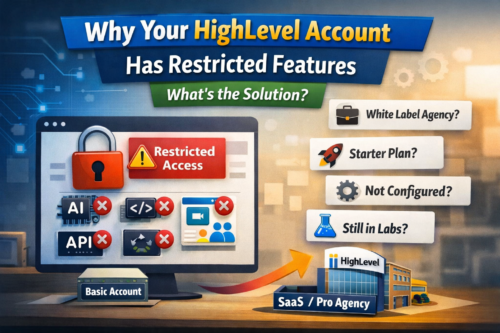
 If you’ve logged into HighLevel and noticed features missing, limited, or not behaving as expected, you’re not imagining it.
This is one of the most common frustrations for HighLevel users in the UK and globally.
The key thing to understand is this. Not all HighLevel accounts have access to the same features.
In this guide, I’ll break down exactly why this happens, what you might be missing, and the most cost-effective way to unlock the full platform.
| Did you find this content useful? |
|---|
| Sign up for my free Marketing Hints, Tips and Hacks email newsletter every Tuesday at 11am. => Sign up here <= |
The 4 Main Reasons HighLevel Features Are Missing
Let’s go through the four most common scenarios.
1. You Bought Your Account Through a White Label Agency
Many businesses access HighLevel through a white label provider.
This often includes onboarding, support, and pre-built systems, which is valuable.
However, agencies can control which features are available based on the plan you are on.
What This Means
You may not have access to:
- Certain automation features
- AI tools
- Advanced integrations
- Premium functionality reserved for higher tiers
What To Do
Contact your agency and ask:
- What features are included in your plan
- What is restricted
- What upgrade options are available
In most cases, upgrading your plan with them will unlock the missing features.
2. You Signed Up Directly (Starter or Unlimited Plan Limitations)
If you went directly to HighLevel, or you’ve been given a sub account from someone on a Starter or Unlimited Agency plan, you may still be limited.
Even though you are using HighLevel, you may not have access to the full ecosystem.
Features Commonly Missing
As of now, these can include:
- Advanced AI features
- Full API access
- Custom Objects
- Kollab (courses and communities marketplace)
These are typically only available through SaaS / Pro-level agency accounts.
Who This Affects Most
You’ll feel this limitation if you are:
- Building advanced automations
- Integrating with external systems
- Running a SaaS or agency model
- Creating structured data systems
- Delivering courses or communities
3. The Feature Exists, But It’s Not Set Up Properly
Before assuming your account is restricted, it’s worth checking something simpler.
Sometimes the feature is there. It just hasn’t been configured.
HighLevel relies heavily on correct setup.
Common Setup Issues
- AI tools not visible due to settings or permissions
- Email not working due to domain or Mailgun configuration
- Phone, SMS or WhatsApp not working due to Twilio setup
- API access not functioning due to permissions or configuration
- Workflows not running due to missing triggers or being unpublished
Quick Checklist
- Is the feature enabled in settings?
- Are integrations connected?
- Are domains and sending services verified?
- Do you have the right user permissions?
If all of that checks out, then you’re likely dealing with a plan limitation instead.
4. The Feature Is Still in Labs (Early Access)
This is one of the biggest causes of confusion right now.
HighLevel releases new features constantly, and many appear first in Labs.
This is essentially early access or beta testing.
Why This Causes Confusion
You might see:
- YouTube videos showcasing new features
- Posts in Facebook groups
- Agencies demonstrating new tools
You log in expecting to see it.
But it’s not there.
That’s because it hasn’t been fully released yet.
What You Need To Know
Features in Labs:
- May still have bugs
- May be incomplete
- May change before full release
Your Options
- Ask your agency to enable Labs access
- Wait for the official rollout
Simple Rule
If you’ve seen a feature online but can’t find it, there’s a good chance it’s still in Labs.
HighLevel Plan Comparison (Why Features Differ)
Here’s a simplified breakdown to help you understand where the limitations come from:
| Feature / Capability | Starter Agency | Unlimited Agency | SaaS / Pro Agency |
|---|---|---|---|
| Core CRM & Funnels | ✅ | ✅ | ✅ |
| Basic Automations | ✅ | ✅ | ✅ |
| Advanced AI Features | ❌ / Limited | ❌ / Limited | ✅ |
| Full API Access | ❌ | ❌ | ✅ |
| Custom Objects | ❌ | ❌ | ✅ |
| SaaS Mode | ❌ | ❌ | ✅ |
| Kollab (Communities) | ❌ | ❌ | ✅ |
This is why two people using “HighLevel” can have very different experiences.
How To Unlock Full HighLevel Features
If you’ve identified that your account is restricted, you have two realistic options.
Option 1. Upgrade Your Own Agency Account
You can upgrade to a SaaS / Pro plan (around $497/month).
This gives full access to everything.
However, unless you are running your own SaaS or agency at scale, this is often overkill.
Option 2. Move Your Sub Account to a SaaS / Pro Agency (Smarter Option)
This is usually the most cost-effective route.
You can:
- Keep your existing data and setup
- Unlock advanced features
- Avoid paying for a full agency subscription
- Get support from an experienced provider
How We Help at MarketerM8
If you’re currently stuck with a restricted HighLevel account, this is exactly what we help with.
At MarketerM8, we operate on a SaaS / Pro HighLevel infrastructure.
That means we can:
- Accept and migrate your existing sub account
- Unlock advanced features
- Help you implement them properly
- Support you with ongoing optimisation
Whether you’re a business owner, agency, or advanced user, we help you get the most out of HighLevel without unnecessary cost.
Final Thoughts
If features are missing in your HighLevel account, it’s rarely a bug.
It usually comes down to one of four things:
- Your agency has restricted your plan
- You’re on a Starter or Unlimited account
- The feature hasn’t been set up properly
- The feature is still in Labs
Once you identify which one applies, the solution becomes clear.
Written by Julian Mills – HighLevel consultant and marketing strategist. About Julian Mills.

